Tag: server

  • AI-Powered Affordable Web Hosting for Business Growth

    AI-Powered Affordable Web Hosting for Business Growth

    In today’s digital age, having a strong online presence is essential for any business to succeed. A key part of this is choosing the right web hosting service. Affordable Web hosting is like renting space on the internet where your website lives, and just like in real life, the location and quality of that space can make a big difference. Affordable Web Hosting services are great for businesses on a budget, but what if you could get even more value? This is where Artificial Intelligence (AI) steps in, making web hosting not only more affordable but also smarter and more efficient.

    Improved Website Performance

    AI helps improve your website’s performance by automatically optimizing various aspects. For instance, AI can analyze traffic patterns and predict high traffic times. During these peak periods, AI can allocate more resources to your website, ensuring it runs smoothly without any slowdowns or crashes. This means your customers have a better experience, leading to more sales and better customer satisfaction. Additionally, AI can compress images and optimize code on your website to make it load faster, which is crucial because a fast-loading site keeps visitors engaged and reduces bounce rates.

    Enhanced Security

    Security is a top concern for any business, especially when it comes to affordable web hosting. AI helps in protecting your website from cyber threats by constantly monitoring for any suspicious activity. If AI detects something unusual, like a hacking attempt, it can take immediate action to protect your site. This includes blocking malicious IP addresses, identifying potential vulnerabilities, and even predicting future threats based on patterns. This proactive approach helps keep your website safe, which is essential for maintaining customer trust and safeguarding your business’s reputation.

    Efficient Resource Management

    With AI, affordable web hosting becomes more efficient in terms of resource management. AI can monitor your website’s performance and adjust resources like bandwidth and storage based on real-time needs. For example, if your website suddenly experiences a spike in traffic due to a sale or promotion, AI can automatically allocate additional bandwidth to handle the extra visitors. This not only ensures your website remains fast and responsive but also helps in reducing costs since you only pay for the resources you use.

    24/7 Customer Support

    AI-powered chatbots provide round-the-clock customer support for your affordable web hosting service. These chatbots can answer common questions, troubleshoot issues, and even guide users through complex tasks. This means that even if you face a problem at odd hours, AI is there to help, ensuring that your website remains up and running. The quick and efficient support provided by AI reduces downtime, which is crucial for any online business.

    Automated Backups and Updates

    Regular backups and software updates are vital for the health of your website. AI takes the hassle out of this by automating the process. AI can schedule regular backups and store them securely, so you always have a copy of your website’s data in case something goes wrong. Similarly, AI can handle software updates, ensuring your website is always running on the latest and most secure version. This reduces the risk of bugs and security vulnerabilities, giving you peace of mind.

    Cost-Effective Solutions

    One of the biggest advantages of AI in affordable web hosting is cost-effectiveness. AI automates many tasks that would otherwise require manual intervention, reducing the need for a large IT team. This means lower operational costs, which translate into more affordable hosting packages for businesses. Furthermore, AI’s ability to optimize resources means you’re not overpaying for unused capacity, making affordable web hosting more economical.


    Conclusion

    AI is transforming affordable web hosting services by making them smarter, more efficient, and more secure. By leveraging AI, businesses can ensure their websites perform at their best, providing a seamless experience for visitors while keeping costs down. As AI technology continues to evolve, we can expect even more innovative solutions that will further enhance the value of web hosting services, helping businesses of all sizes to grow and thrive in the digital world.

  • MySQL Database Solution with Excellent Web Hosting

    MySQL Database Solution with Excellent Web Hosting

    Web hosting is the foundation for any online presence, whether it’s a simple blog, an e-commerce site, or a complex web application. As businesses grow and their needs become more sophisticated, the demand for robust database solutions also increases. MySQL, an open-source relational database management system, is a popular choice for many web hosting environments due to its reliability, scalability, and ease of use. For those looking to support unlimited MySQL Database on their hosting accounts, there are several considerations and best practices to ensure optimal performance and management.

    Choose the Right Hosting Plan

    Selecting a web hosting service that allows for endless MySQL databases is the first step towards supporting them. While some hosting providers offer infinite databases, others impose restrictions on users according to the amount of CPU, RAM, and storage they utilize. In this regard, shared hosting plans are typically less versatile than dedicated servers, cloud hosting, and VPS (Virtual Private Server) hosting.

    It’s crucial to consider all of the resources accessible while selecting a plan. A hosting service may promise infinite databases, but for a database to operate effectively, it needs a specific number of server resources. Should the hosting plan be insufficient in terms of CPU power, memory, or storage, your databases’ performance may need to improve.

    Optimize Database Performance

    Performance optimization must be carefully considered while supporting an infinite number of MySQL databases. Here are some helpful strategies:

    Indexing: Correct table indexing can greatly expedite the retrieval of data. You can make sure that your databases function well even when they are under a lot of stress by cutting down on the time it takes to find data.

    Query Optimization: Write SQL queries that are optimized to cut down on pointless computations. This may entail making the most use of joins, eliminating subqueries whenever feasible, and making sure your queries are as simple as possible.

    Connection Management: To cut down on the overhead of creating new database connections, use persistent connections. But be aware of any connection restrictions imposed by your hosting company.

    Caching: Put caching techniques in place to lighten the strain on your MySQL databases. Database queries can be reduced and speed can be improved by keeping frequently requested data in memory.

    Regular Maintenance: To quickly detect and fix performance issues, carry out routine maintenance operations including clearing out unnecessary data, optimizing tables, and keeping an eye on database logs.

    Scalable Storage Solutions

    As the number of databases grows, so does the need for scalable storage solutions. Ensure that your hosting plan offers expandable storage or consider integrating cloud storage solutions like Amazon S3 or Google Cloud Storage to offload some of the data. Utilizing scalable storage ensures that your databases can grow without being constrained by physical disk space limitations.

    Security Best Practices

    The complexity of data security grows while managing several MySQL databases. The following are some crucial security procedures:

    User Privileges: Give each database’s users the proper permissions. Limit access using the least privilege approach and refrain from utilizing the root user for routine tasks.

    Regular Backups: To guarantee that all databases are routinely backed up, implement automated backup systems. For extra security, think about utilizing both off-site and on-site backups.

    Encryption: When sensitive data is in transit or at rest, encrypt it. MySQL offers built-in encryption features for storing data in your databases, and it supports SSL/TLS for secure data transfers.

    Monitoring and Alerts: Install monitoring software to monitor database activities. Alerts can be used to inform you of suspicious activities or possible security breaches.

    Efficient Database Management

    It can be difficult to manage a big number of MySQL databases. To make management more efficient:

    Database Naming Conventions: For ease of maintenance and to prevent confusion, give your databases distinct names.

    Automation Tools: For regular operations like backups, upgrades, and monitoring, use automation tools like scripts or database management software.

    Documentation: Keep detailed records of your user permissions, database setups, and maintenance plans. For troubleshooting and orienting new team members, this will be really helpful.


    Conclusion

    It is possible to support an infinite number of MySQL databases in a web hosting environment with the appropriate preparation, tools, and administration techniques. Through the selection of an appropriate hosting package, performance optimization, implementation of scalable storage, strong security, and effective database management, you can build a strong and adaptable infrastructure that can handle the demands of your expanding online business. These best practices can help you get the most of your MySQL databases and make sure they run effectively at scale, regardless of the size of your company.

  • User-Friendly WooCommerce Hosting for Your E-commerce Site

    User-Friendly WooCommerce Hosting for Your E-commerce Site

    Success in the quickly changing e-commerce industry depends on having a dependable and user-friendly web hosting service. WordPress WooCommerce Hosting offers a strong, adaptable, and user-friendly framework to create and expand your online store, regardless of experience level.

    Why Choose WordPress WooCommerce?

    Seamless Integration with WordPress
    Because WooCommerce was created expressly for WordPress, it works flawlessly with the most widely used content management system (CMS) on the planet. With this integration, you can take advantage of all of WordPress’s capabilities, such as its large plugin ecosystem, simple content management system, and plethora of e-commerce-specific themes.

    User-Friendly Interface
    The intuitive interface of WordPress WooCommerce is one of its best qualities. It is not necessary to be a tech specialist to establish and run your virtual business. With its user-friendly dashboards, simple product administration, and integrated tools for managing orders and customer data, WooCommerce frees you from the burden of complicated technical setups so you can concentrate on growing your business.

    Customization and Flexibility
    WooCommerce gives you the ability to customize your store to meet the specific needs of your e-commerce business, which are all different. You don’t need to know any coding to alter the look and feel of your website thanks to the thousands of themes and plugins that are available. With WooCommerce’s extensive selection of extensions, you can easily create a store that precisely reflects your brand, including payment methods and delivery choices.

    Scalability
    Your website should expand along with your business. Because WooCommerce is designed to grow, it can manage thousands of products without sacrificing functionality. Because of its scalability, it is the perfect option for companies of all sizes, from start-ups to well-established multinationals.

    The Importance of Choosing the Right Web Hosting

    Although WooCommerce offers a strong base, the web hosting provider you select will have a major impact on your online store’s functionality, security, and dependability. Making the proper WordPress WooCommerce Hosting choice can greatly improve the performance, security, and general usability of your website.

    Speed and Performance Optimization
    E-commerce websites must load quickly to prevent potential customers from abandoning their carts. A quality WooCommerce Hosting provider optimizes your site for speed, ensuring fast loading times even during high traffic periods. This not only improves user experience but also positively impacts your search engine rankings.

    Enhanced Security Features
    A significant priority in e-commerce is security. Strong security features including firewall protection, frequent backups, virus scanning, and SSL certificates are often included with dedicated WooCommerce Hosting packages. By taking these precautions, you can keep your website safe from online attacks and safeguard the private information of your clients.

    Reliable Customer Support
    E-commerce is always active, thus your assistance shouldn’t stop either. By choosing a dedicated WooCommerce hosting company, you can get in touch with a team of professionals who understand the platform and are available around-the-clock for assistance. Having dependable help can make all the difference, whether you run into technical difficulties or need guidance on optimizing your store.

    Automatic Updates and Maintenance
    Updating your website is crucial for both performance and security. To guarantee that your website is running on the newest and most secure versions, quality hosting companies frequently incorporate automatic upgrades for WordPress, WooCommerce, and any installed plugins. You can concentrate on your business instead of worrying about the technical maintenance of your website with this hands-off approach.

    Conclusion

    Selecting a user-friendly WordPress WooCommerce web hosting option is a wise choice for any e-commerce company. It provides an easy-to-use feature set, scalability, and flexibility that make maintaining an online store effortless. You can make sure that your e-commerce site is ready to manage the demands of online retail and offers your clients a seamless, safe, and joyful purchasing experience by combining WooCommerce with the best hosting company.

  • Bandwidth’s Role in Affordable Web Hosting Service

    Bandwidth’s Role in Affordable Web Hosting Service

    When it comes to affordable web hosting, bandwidth is a crucial factor that plays a significant role in determining the performance, accessibility, and overall cost-effectiveness of a website. Understanding how bandwidth works and its impact on affordable web hosting can help businesses and individuals make informed decisions about their hosting needs.

    Understanding Bandwidth in Web Hosting

    Bandwidth in web hosting refers to the amount of data that can be transferred between your website and its users over a specific period, usually measured in gigabytes (GB) or terabytes (TB) per month. This data transfer includes everything from loading web pages, downloading files, streaming videos, to any other activities that involve the exchange of information between your server and the users’ devices.

    Think of bandwidth as a pipeline that carries data. The wider the pipeline, the more data can flow through it at any given time. If your website has limited bandwidth, it can only serve a limited number of visitors simultaneously before experiencing slowdowns or even downtime. Conversely, ample bandwidth allows your site to handle high traffic and large data transfers without any performance issues.

    The Role of Bandwidth in Website Performance

    One of the primary ways bandwidth helps a website is by ensuring smooth and fast performance. A website with sufficient bandwidth can efficiently handle a large number of visitors, especially during peak times. If your website frequently experiences high traffic, having enough bandwidth ensures that your visitors have a seamless browsing experience, with pages loading quickly and without delays.

    In contrast, insufficient bandwidth can lead to slower load times, buffering issues with media content, and even outages during traffic spikes. These issues can frustrate users, lead to higher bounce rates, and ultimately harm your website’s reputation and effectiveness.

    Scalability and Flexibility

    Smaller websites or those with little traffic may be able to get by with the restricted bandwidth that many affordable web hosting plans offer. But, as your website expands and draws more users, your bandwidth requirements will rise. To handle this increase without having to pay large additional expenses, you must have a hosting plan with expandable bandwidth alternatives.

    Numerous web hosts have flexible plans that let you increase your bandwidth whenever you need it. Because of its scalability, your website will be able to accommodate growing traffic and data requirements without requiring a total redesign of your hosting configuration. It also aids in preventing unforeseen expenses that can result from going over your allotted bandwidth.

    Cost-Effectiveness of Bandwidth in Web Hosting

    When it comes to affordable web hosting, bandwidth is a critical factor in determining the overall cost. Hosting plans with higher bandwidth typically come at a higher price, but they offer better performance and reliability. It’s important to balance your bandwidth needs with your budget to find a hosting plan that provides the best value for your website. For small businesses or personal websites, opting for a plan with sufficient bandwidth at a reasonable price can be a cost-effective solution. This allows the website to perform well under normal traffic conditions without overspending on resources that may not be needed. On the other hand, websites with higher traffic volumes, such as e-commerce platforms or media-rich sites, may benefit from investing in plans with more generous bandwidth allocations. Although these plans might be more expensive, the improved user experience and reliability they offer can lead to higher customer satisfaction and better business outcomes.

    Avoiding Bandwidth Overages and Additional Costs

    One of the risks associated with affordable web hosting is the possibility of bandwidth overages, where your website exceeds its allocated bandwidth. This can result in additional charges or even temporary suspension of your website, depending on the hosting provider’s policies. Monitoring your website’s bandwidth usage and choosing a plan that matches your traffic patterns can help avoid these issues. The hosting provider offers tools to track bandwidth usage in real-time, allowing you to adjust your plan or optimize your website to reduce data transfer. Compressing images, using content delivery networks (CDNs), and minimizing unnecessary data-heavy elements are some of the strategies to manage bandwidth effectively.

    Conclusion

    For affordable web hosting, bandwidth is essential since it affects the cost, scalability, and performance of your website. It is possible to guarantee that your website provides a dependable and seamless experience for your visitors without going over budget by assessing your bandwidth requirements and selecting a hosting plan that fits your demands and traffic volume expectations. The best possible balance between web hosting pricing and functionality can only be maintained by allocating the appropriate amount of bandwidth.

  • Explore the Advantages of Dedicated GPU Server | Your Business Success

    Explore the Advantages of Dedicated GPU Server | Your Business Success

    Most people only consider the Central Processing Units installed on servers when they think of processors. But CPUs are outdated technology. These days, companies are selecting GPU servers—better, more potent servers. The pros and advantages of GPU servers will be covered in this essay. Now let’s get going!

    Understanding the Role of Dedicated GPU Server

    A high-performance computing solution made especially to manage demanding computational activities requiring a lot of graphics processing power is a Dedicated GPU Server. GPU (Graphics Processing Unit) servers use strong GPUs to speed up parallel processing and carry out intricate computations at impressive speeds, in contrast to standard servers that only use CPUs (Central Processing Units) to process data.

    Originally designed to render visuals for video games, GPUs have matured into flexible processors that may be used for a variety of tasks outside of gaming. For applications like machine learning, artificial intelligence (AI), data analysis, scientific simulations, 3D rendering, and cryptocurrency mining, dedicated GPU servers are especially helpful. They are perfect for sectors that require tremendous computing power and efficiency since they can process enormous amounts of data simultaneously.

    Businesses may benefit from enhanced processing power without having to make large hardware investments or maintain a GPU server by dedicating one. These servers enable businesses to run complicated algorithms and models more quickly and effectively because they provide performance, scalability, and flexibility that is unmatched. Dedicated GPU servers are a crucial tool in today’s data-driven world as they allow organizations to boost productivity, innovate more quickly, and acquire a competitive edge in their respective sectors.

    Common Uses and Applications of GPU Servers

    Tasks requiring accelerated computing capabilities and massive parallel processing power are typically handled by GPU servers. Graphics Processing Units (GPUs), which are excellent at managing complicated computations concurrently, are used in these servers. Common applications include:

    Machine Learning and AI: GPU servers are crucial in training and deploying machine learning models due to their capacity to process massive datasets and perform matrix operations fast.

    Data analytics: GPU servers speed up data manipulation and analysis, making them useful for tasks like big data processing, predictive analytics, and real-time data visualization.

    Scientific Simulations: In domains such as physics, chemistry, and engineering, where computations entail complex mathematical models, dedicated GPU servers are indispensable.

    Rendering and Visual Effects: High-resolution graphics and intricate visual effects are rendered by GPU servers, which are used in the animation, cinema, and virtual reality industries.

    GPUs are necessary for mining cryptocurrencies, such as Ethereum, where processing power is needed to validate transactions and create new coins.

    Medical Imaging: By speeding up image processing operations like MRIs and CT scans, dedicated GPU servers improve medical diagnostics and enable earlier diagnosis and treatment planning.

    Scientific Simulations: In domains such as physics, chemistry, and engineering, where computations entail complex mathematical models, dedicated GPU servers are indispensable.

    Rendering and Visual Effects: High-resolution graphics and intricate visual effects are rendered by GPU servers, which are used in the animation, cinema, and virtual reality industries.

    Cryptocurrency Mining: GPUs are necessary for mining cryptocurrencies, such as Ethereum, where processing power is needed to validate transactions and create new coins.

    Medical Imaging: By speeding up image processing operations like MRIs and CT scans, GPU servers improve medical diagnostics and enable earlier diagnosis and treatment planning.

    Dedicated GPU Servers are essential for cutting-edge technological applications in a wide range of industries since they maximize performance, shorten processing times, and allow scalability for a variety of computing needs.

    The Benefits of Using a Dedicated GPU Server

    A GPU dedicated server is a great option for companies and organizations that need high-performance computing because it has several benefits. These servers include strong Graphics Processing Units (GPUs) that can effectively perform jobs requiring parallel processing. The following are some main advantages:

    Enhanced Computational Power: Dedicated GPU servers are very good at handling big datasets and carrying out intricate calculations. For projects like data analytics, scientific simulations, machine learning, and 3D rendering, this is essential.

    Speed and Efficiency: By processing several tasks at once, GPUs drastically cut down on the amount of time needed for data processing and analysis. As a result, projects are completed more quickly and productivity is increased.

    Scalability: As computing demands increase, GPU-dedicated servers may readily grow to meet new demands. Businesses can grow thanks to this flexibility without having to make large hardware investments.

    Cost-effective: Businesses can obtain high-performance computing without having to buy and maintain pricey hardware by deploying a GPU dedicated server. This guarantees effective resource usage and lowers overall operating expenses.

    Enhanced Efficiency for AI and ML: Dedicated GPU Servers are engineered to meet the rigorous demands of machine learning (ML) and artificial intelligence (AI) applications. They facilitate quicker model deployment and training, which produces faster insights and more accurate outputs.

    Conclusion

    A GPU Dedicated Server is an essential tool for modern computing operations in a variety of industries because they offer unmatched processing speed, scalability, and cost-efficiency.

  • The Complete Guide to Bulk Domain Management

    The Complete Guide to Bulk Domain Management

    Managing multiple domains can be a complex and time-consuming task. Bulk domain management streamlines the process, saving you time and effort while ensuring consistency across all your domains. Here are some essential tasks you should consider managing in bulk:

    1. Domain Registration and Renewals

    Registering and renewing domains in bulk is a significant time-saver. Instead of handling each domain individually, bulk actions allow you to register or renew multiple domains simultaneously. This approach is especially useful for businesses and individuals managing large portfolios, helping to avoid the risk of domains expiring and becoming unavailable.

    2. DNS Management

    DNS settings are crucial for directing your domain traffic to the correct web servers. Managing DNS records in bulk ensures that all your domains have consistent and correct settings. This can include updating A records, CNAMEs, MX records, and other DNS configurations across multiple domains, which helps in maintaining site availability and performance.

    3. WHOIS Information Updates

    Keeping your WHOIS information up to date is essential for compliance and communication. Bulk updates allow you to change contact information, such as email addresses, phone numbers, and mailing addresses, across all your domains at once. This ensures that your contact details are accurate and consistent, which is vital for domain verification and renewal notices.

    4. Domain Locking

    Domain locking prevents unauthorised transfers of your domains. By applying this security measure in bulk, you can safeguard all your domains simultaneously, reducing the risk of theft or accidental transfers. Ensuring that all your domains are locked is a critical step in maintaining domain security.

    5. Name Server Changes

    Changing name servers in bulk is essential when you are migrating your domains to an affordable web hosting provider or DNS service. This process ensures that all your domains point to the correct name servers without the need to update each domain individually, streamlining the transition and minimising downtime.

    6. Email Forwarding

    For businesses managing multiple domains, setting up email forwarding in bulk can ensure that emails sent to any domain in your portfolio are directed to a central inbox. This helps in managing communications efficiently and ensures that no important messages are missed.

    7. SSL Certificate Management

    SSL certificates are vital for securing your websites. Managing SSL certificates in bulk allows you to purchase, install, and renew certificates for multiple domains at once. This not only saves time but also ensures that all your domains are protected and compliant with security standards.

    8. Subdomain Creation

    If you use subdomains for different sections of your website or for different services, creating and managing these in bulk can save significant time. This approach ensures consistency in the structure and management of your subdomains, making it easier to maintain and update them as needed.

    9. Automated Reporting

    Set up automated reports for your domain portfolio to keep track of renewals, expirations, DNS settings, and other critical information. This allows you to monitor the status of your domains without manually checking each one, ensuring you stay informed about any necessary actions.

    10. Bulk Transfer

    Transferring domains between registrars can be cumbersome. Bulk transfer simplifies this process, allowing you to move multiple domains at once, ensuring a smooth transition with minimal downtime and administrative effort.

    Conclusion

    Bulk domain management is essential for efficiently handling large domain portfolios. By performing tasks such as registration, DNS management, WHOIS updates, and SSL certificate management in bulk, you can save time, ensure consistency, and enhance the security of your domains. Adopting bulk management practices allows you to focus on strategic initiatives while maintaining control over your domain assets.

  • How to Integrate Your Business Email with Google Workspace

    How to Integrate Your Business Email with Google Workspace

    In today’s digital age, having a professional and efficient email system is crucial for businesses of all sizes. Google Workspace (formerly G Suite) offers a comprehensive suite of productivity tools, including Gmail, which is renowned for its reliability and ease of use. Integrating your business email with Google Workspace can streamline your communication, enhance collaboration, and boost productivity. This guide will walk you through the steps to seamlessly integrate your business email with Google Workspace.

    Why Integrate Your Business Email with Google Workspace?

    Before diving into the integration process, let’s explore some of the benefits of using Google Workspace for your business email:

    1. Professionalism: Using a business domain for your email (e.g., [email protected]) adds a level of professionalism and credibility to your communications.
    2. Storage and Collaboration: Google Workspace offers ample storage for emails and documents, and its collaborative tools (Google Drive, Docs, Sheets, etc.) enhance teamwork.
    3. Security: Google Workspace provides robust security features, including two-factor authentication, data encryption, and advanced phishing protection.
    4. Accessibility: With Google Workspace, you can access your email and documents from any device, anywhere, ensuring you stay connected on the go.

    Step-by-Step Guide to Integrate Your Business Email with Google Workspace

    1. Sign Up for Google Workspace

    The first step in integrating your business email with Google Workspace is to sign up for the service. Follow these steps:

    1. Visit the Google Workspace website.
    2. Click on the “Get Started” button.
    3. Follow the prompts to enter your business information, such as your business name, number of employees, and country.
    4. Provide your current email address and choose a domain for your business email. If you already have a domain, you can use it; otherwise, you can purchase one through Google.

    2. Verify Your Domain

    To use your custom domain with Google Workspace, you need to verify ownership of the domain. Here’s how:

    1. Log in to your domain registrar’s website (e.g., Bytenap,10gbhosting) and access the DNS settings.
    2. Google will provide you with a TXT record to add to your domain’s DNS settings. This record confirms your ownership of the domain.
    3. Add the TXT record to your DNS settings and save the changes.
    4. Return to the Google Workspace setup page and click “Verify” to complete the verification process.

    3. Create User Accounts

    Once your domain is verified, you can start creating user accounts for your employees:

    1. In the Google Workspace Admin console, click on “Users.”
    2. Click the “Add New User” button.
    3. Enter the user’s first name, last name, and desired email address (e.g., [email protected]).
    4. Set a temporary password for the user and provide them with login instructions.

    4. Set Up Email Routing

    To ensure that your business emails are routed correctly through Google Workspace, you need to update your domain’s MX (Mail Exchange) records:

    1. Go to your domain registrar’s website and access the DNS settings.
    2. Locate the MX records section and delete any existing MX records.
    3. Add the new MX records provided by Google Workspace. These records ensure that emails sent to your domain are delivered to Google’s servers.
    4. Save the changes and allow some time for the DNS propagation (this can take up to 48 hours).

    5. Configure Email Clients and Devices

    Your employees can access their new Google Workspace emails via the Gmail web interface or by configuring their preferred email clients (e.g., Microsoft Outlook, Apple Mail). To configure an email client:

    1. Open the email client and navigate to the account setup section.
    2. Enter the user’s email address and password.
    3. Use the following server settings:
    • Incoming Mail Server: imap.gmail.com (IMAP) or pop.gmail.com (POP)
    • Outgoing Mail Server: smtp.gmail.com
    • Port Numbers: IMAP: 993, POP: 995, SMTP: 465 or 587

         4. Save the settings and test the email account to ensure it’s working correctly.

    6. Train Your Team

    To make the most of Google Workspace, it’s essential to train your team on its features and functionalities. Offer training sessions on:

    1. Using Gmail for business communications.
    2. Collaborating on documents with Google Drive, Docs, Sheets, and Slides.
    3. Scheduling and managing meetings with Google Calendar.
    4. Leveraging Google Meet for video conferencing.

    7. Optimize Security Settings

    Ensure your business email remains secure by configuring advanced security settings in the Google Workspace Admin console:

    1. Implement two-factor authentication (2FA) across all user accounts.
    2. Set up data loss prevention (DLP) rules to protect sensitive information.
    3. Monitor and audit account activity to detect suspicious behaviour.


    Conclusion

    Integrating your business email with Google Workspace is a smart move that can enhance your organization’s communication and collaboration capabilities. Following these steps, you can ensure a smooth transition to Google Workspace and take full advantage of its powerful features. ByteNap, as a trusted business email and Google Workspace hosting service provider, is here to support you throughout the integration process, ensuring that your business email system is efficient, secure, and professional. Remember, a well-integrated and secure email system is a cornerstone of any successful business in the digital age.

  • The Detailed Guide to Web Hosting

    The Detailed Guide to Web Hosting

    Choosing the right hosting for your website project can be challenging. Our Ultimate Guide to Web Hosting can assist you in understanding different hosting options to make an informed decision.

    If you are new to web hosting, managed hosting is a great way to begin. Managed hosting simplifies the process of launching your website, eliminating the need to navigate through technical complexities associated with services like VPS and Dedicated Servers. With managed hosting, the hosting company handles technical configurations and server issues. These services are scalable, providing growing websites with the necessary infrastructure to build, launch, and expand their projects easily.

    Explore our comprehensive guide to web hosting to discover various hosting types and select the best service to meet your website’s requirements.

    What is Web Hosting?

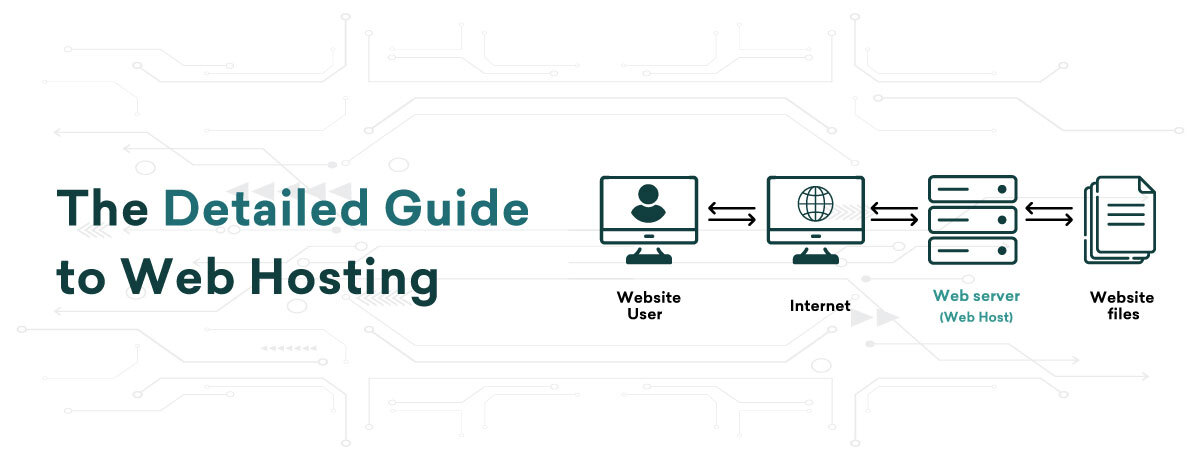
    Web hosting is a service on the internet that enables you to store, manage, and retrieve files, websites, and applications. This service relies on data storage servers and other infrastructure that are connected to the internet, operating 24/7 to ensure constant accessibility to the stored files online.

    In essence, when you create a website, all its files are housed on data servers. When a visitor accesses your site, data is transmitted from these hosting servers to their browser. The combined functions of storage, processing, and data transfer over the internet constitute web hosting services.

    Entities providing data storage and processing servers for web hosting are known as web hosts. By availing of a web hosting service, you render your website reachable to online users through the data servers provided by hosting companies. With this setup, anyone on the internet can visit your site by entering your domain in a browser.

    Since most businesses lack their own servers, they lease server space from web hosting entities. Servers serve as the technical backbone for housing websites and applications. Reputable web hosting providers deliver on the promise of 24/7 online availability and provide crucial technical assistance. This support becomes vital for website owners lacking the necessary technical know-how to handle various aspects of website hosting.

    How Does Web Hosting Work?

    The primary function of web hosting is to ensure your website is accessible on the internet. It involves data servers that are continuously operational and connected to the internet 24×7, enabling online visitors to access your websites. When a user enters a domain in a web browser like Google Chrome, the website hosted on these servers is retrieved and displayed to them online.

    Web hosting providers offer the necessary technologies for your sites to function effectively on the internet. They also provide server management support services to website owners lacking technical expertise in server management. With technical assistance from web hosting companies, website and business owners can concentrate on expanding their business rather than dealing with server maintenance.

    What are Different Types of Web Hosting?

    Various web hosting services are accessible in the market to cater to your requirements. The primary varieties of website hosting services include:

    1. Shared Hosting

    Shared hosting is ideal for small and new websites with low traffic. In this service, all web files from various users are stored on one server. This means server resources such as CPU, RAM, and disk space are shared among multiple websites on the same server.

    Server resources are shared among various web hosting account users, providing cost-effective access. Due to not leasing the entire server, expenses are divided among users, making shared hosting ideal and budget-friendly for new website owners.

    2. Virtual Private Server (VPS) Hosting

    This hosting service features a virtual server within a main physical server, splitting a large data storage and processing unit into smaller virtual servers. The division is not physical but virtual, concerning server resources like CPU, RAM, and Disk Space. Each virtual server has independent CPU, RAM, and disk space allocation, offering dedicated server performance at a budget-friendly price.

    VPS hosting is beneficial for expanding websites as all projects are hosted in a separate space on the server, though it is shared with other users. This service fulfills your needs for personalized web hosting. While handling traffic spikes and optimizing performance, it can be influenced by other sites on the server. In essence, VPS offers superior performance to shared hosting yet falls below dedicated servers. Furthermore, VPS demands slightly less technical know-how compared to Dedicated hosting.

    If you have a resource-intensive web project and seek affordable dedicated hosting services without the necessary technical expertise, you can opt for managed VPS hosting. This way, you can benefit from hosting operations at costs similar to shared hosting, while having hosting infrastructure comparable to dedicated servers. Through reliable VPS hosting servers, you will attain full root control over your servers.

    3. Dedicated Hosting

    Dedicated hosting grants website owners complete control over servers. It provides exclusive rental for the website, allowing enterprises handling numerous websites and applications to have full root and admin access. This service enables centralized control, including security and operating system management. However, the cost factor may deter small business owners from opting for this level of server resources.

    When opting for dedicated hosting, you rent the entire server for exclusive use, making it pricier than other services. Large websites or organizations with high online traffic often choose dedicated hosting for full server control. If you need technical support, consider managed dedicated hosting for seamless web application hosting.

    4. Cloud Hosting

    In today’s modern world, cloud infrastructure is rapidly gaining popularity. Cloud hosting involves a cluster of interconnected servers within a single network. Therefore, deploying web applications within this connected hosting infrastructure provides maximum scalability and accessibility for your web files. 

    Hosting servers are susceptible to malfunctions and encounter technical issues when managing resource-intensive websites and applications with high traffic fluctuations. Cloud hosting services provide users with resources distributed across multiple servers, minimizing the risk of downtime caused by server malfunctions.

    If your website expands, cloud hosting resources are scalable, allowing your site or app to utilize resources as needed. Essentially, in cloud hosting, resources are virtually limitless for scalability, and you only pay for the resources utilized by your site or app during a specific timeframe.

    5. Reseller Hosting

    In the hosting industry, a reseller hosting provider acts as a wholesaler while the reseller functions as a retailer. Reseller web hosting involves a smaller hosting company (the retailer) leasing servers and resources from a larger hosting company (the wholesaler), then selling these services to clients for a profit.

    Reseller hosting is ideal for small web service companies that cater to local clients, offering a cost-effective solution as they avoid significant upfront investments in infrastructure. Providers of reseller hosting services offer fully white-labeled solutions, enabling resellers to brand their hosting business effectively.

    Moreover, reseller hosting providers facilitate billing for end clients and offer technical support to resellers, alleviating concerns about  technical issues and web hosting management for the clients of resellers.

    Which Web Hosting Service is Right for You?

    After learning about various web hosting services, you might be wondering – which is the best hosting for me? When selecting web hosting services, choose a plan that fulfills your hosting needs. Assess if each plan aligns with your web hosting requirements.

    Choosing the appropriate web hosting plan involves careful consideration of the following aspects:

    – Number of websites to be hosted

    – Required disk space and RAM

    – Bandwidth (data transfer) limit needed

    – Your budget

    For novices and small-scale websites with limited hosting budgets, shared hosting services are recommended. If expecting increased website traffic, opt for VPS hosting services. For total server control, website owners should choose dedicated hosting services. Reseller hosting services cater to users starting their web hosting business.


    Conclusion

    In conclusion, choosing the right web hosting service is critical for your website’s success. Whether you’re a beginner or managing a high-traffic site, understanding options like managed, shared, VPS, dedicated, cloud, and reseller hosting helps match your needs for scalability, control, and budget. Explore our guide to make an informed choice and ensure your site has the solid hosting it needs to thrive online.

  • Benefits of Choosing Windows VPS Hosting

    Benefits of Choosing Windows VPS Hosting

    Shared hosting plans are ideal for budding entrepreneurs, startups, and newbie bloggers. They are well-suited for websites with low traffic and minimal data, providing an affordable and straightforward hosting solution. However, as your website grows in traffic and data, upgrading your hosting plan becomes essential. Compared to shared hosting, a VPS hosting plan offers better performance by providing a dedicated OS, disk space, and higher bandwidth, ensuring an improved user experience.

    Now, let’s explore the benefits of a Windows VPS hosting plan over other hosting options available in the marketplace. But before we dive into the features, let’s understand what a Windows Virtual Private Server (VPS) is. Let’s get started.

    What is Windows VPS Hosting?

    VPS hosting that operates on the Windows OS is known as Windows VPS hosting. This offers users the advantage of a dedicated virtual server with greater control and resources compared to other hosting options. For businesses seeking secure hosting services with Windows-compatible technology and environment, VPS hosting with Windows OS is the ideal choice. For businesses accustomed to using Microsoft systems and tools to oversee various business operations, Windows VPS hosting stands out in its ability to efficiently manage the server.

    Benefits of Windows VPS Hosting

    Backup & Remote Support: In the digital realm, data is invaluable. Windows VPS hosting offers superior data security, regular backups, and round-the-clock remote support from experts, ensuring your data is safeguarded and readily recoverable in case of issues.

    Customized Solutions: Tailor your server to meet specific website needs with Windows VPS hosting. Customize features and allocate resources effectively to handle future demands with ease.

    Higher Reliability: Opting for Windows VPS hosting from a trusted provider in Kolkata ensures enhanced server security, comprehensive data backup, and system reliability. This plan helps prevent unauthorized access and mitigates the risk of malware attacks on personal and business data.

    Dedicated Resources: Windows VPS hosting provides full control over server resources unlike shared hosting. Regardless of traffic surges, your website’s loading time remains consistent, reducing bounce rates and enhancing user experience and satisfaction.

    Why Windows VPS Hosting is a Superior Choice?

    Choosing Windows VPS hosting offers a balanced blend of flexibility, performance, and security. Here are more reasons why this hosting plan is superior:

    Scalable Performance

    Improving website performance involves ensuring fast loading times and smooth operation for users. Opting for a VPS can enhance performance as it reduces the impact of other users on the server. Beyond this, VPS provides benefits like resource accessibility, increased storage, higher bandwidth, and updated technology, all of which can boost website traffic and speed.

    As your business grows, you can easily scale up resources by upgrading your VPS plan. Conversely, during downtimes, you have the flexibility to reduce technical resources. VPS eliminates the need for lengthy data transfers and complex hardware setups, offering a hassle-free experience.

    Moreover, when executing promotional campaigns on your website, such as paid ads or special offers to attract customers, VPS serves as a comprehensive solution to meet your needs.

    Robust Security

    Whether you are an individual or a large company, web hosting security is a major concern for anyone with an online presence. Stolen financial information, data loss, and compromised website content can have a direct negative impact on your business.

    To address these issues, VPS hosts your data files in a secure partition that is inaccessible to other clients, enhancing your data security. With root access to your server unlike shared hosting, you can implement advanced security measures for your server. This independent access to resources helps keep your data safe from other sources.

    For e-commerce businesses in particular, VPS or Dedicated Server Hosting can offer significant benefits. With a dedicated IP address, your website’s identity is unique, especially when providing features like email marketing and secure e-commerce transactions.

    In conclusion, the security provided by VPS can be compared to that of a Dedicated Server at a lower cost. Therefore, opting for VPS will protect your website and data from unauthorized access.

    Cost-Effective Solution

    VPS is the hybrid form of shared and dedicated hosting, offering ample resources at manageable costs. Choosing a Windows VPS allows you to easily scale server specifications as your website expands, making it a more cost-efficient choice than shared hosting. Moreover, scaling disk space and bandwidth to accommodate your site’s growth is effortless, eliminating concerns about server migration or plan changes.

    Unlike with Dedicated Server Hosting, where you must bear the significant expense of purchasing a physical server, with VPS, you only need to invest according to your requirements. 

    Administrative Control: 

    Windows VPS hosting offers extensive administrative control, allowing you to customize and optimize your server environment to meet your business needs. You can install any necessary software or applications, tailor server settings to enhance performance and security, and configure specific features for optimal functionality.

    With full administrative access, you can implement advanced security measures, manage user access, and schedule regular updates to protect your data. Efficient resource management ensures that critical applications receive the necessary CPU, RAM, and storage, maintaining consistent performance even during peak traffic times.

    Administrative control also allows you to set up and manage backup processes, ensuring quick data recovery in case of loss or system failure. Comprehensive monitoring tools keep you informed about server performance and potential issues, enabling proactive maintenance.

    As your business grows, administrative control ensures that you can easily scale your server resources, adding storage, bandwidth, or processing power as needed. This flexibility provides a future-proof solution, ensuring your server infrastructure evolves with your business.


    Conclusion

    Windows VPS hosting is a great option for businesses looking for improved control, performance, and security. While shared hosting suits startups and low-traffic sites, VPS hosting is crucial as your site grows. It provides top-notch data security, regular backups, and round-the-clock support, ensuring constant data protection and accessibility. Customization features enable efficient resource allocation and feature tailoring, maintaining consistent performance and high user satisfaction. Scalability allows easy resource adjustments as your business expands, with strong security measures to safeguard your data. Offering cost-effectiveness and benefits similar to a dedicated server, Windows VPS hosting provides extensive administrative control for optimal server management. This flexibility guarantees your server infrastructure can grow with your business, offering a reliable and scalable solution for expansion.

  • How to Monitor MySQL Databases: A Comprehensive Guide

    How to Monitor MySQL Databases: A Comprehensive Guide

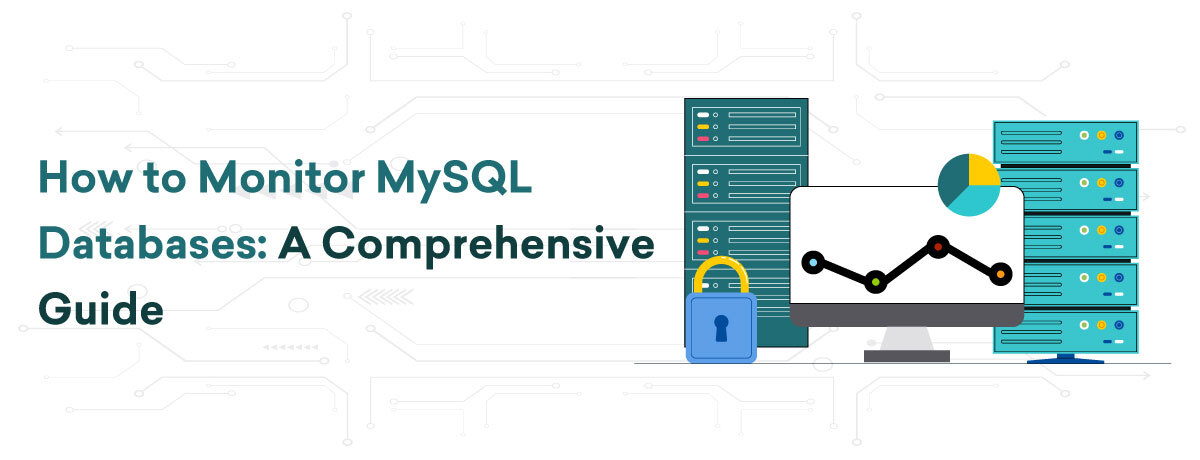
    Monitoring MySQL databases is crucial for maintaining peak performance and safeguarding data integrity. It enables administrators and developers to detect and resolve issues proactively, ensuring seamless database operations. Effective monitoring entails monitoring performance metrics, analyzing query efficiency, and observing server health indicators. By embracing robust monitoring practices, you can optimize MySQL database performance, reduce downtime, and improve user experience.

    Key Metrics to Monitor in MySQL

    Monitoring the correct metrics is crucial for maintaining MySQL database performance and stability. Here are some critical metrics to monitor:

    Performance Metrics

    Monitoring query performance, encompassing execution time, slow queries, and query throughput, aids in identifying inefficient queries requiring optimization. Observing connection statistics like active connections, aborted connections, and connection errors guarantees effective handling of the database load.

    Indicators of Server Health

    High CPU usage could suggest inefficient queries or inadequate server resources. Monitoring CPU utilization is crucial for sustaining peak performance. Tracking memory usage is essential to guarantee that your server possesses adequate resources for seamless operation and can identify memory leaks or excessive consumption due to specific queries.

    Storage Metrics

    Monitoring disk I/O and disk space is crucial for identifying potential bottlenecks caused by sluggish storage devices. Tracking disk read/write operations and available disk space can help prevent the database from running out of storage, thus avoiding crashes or performance degradation.

    Data Quality Metrics

    Regularly monitoring MySQL error logs for signs of corruption or any issues can help prevent data integrity problems. If you utilize replication, keeping an eye on the status and lag of replica servers is crucial to maintain data consistency across all your MySQL instances.

    Metrics for Network

    Network latency and throughput are crucial for identifying issues that may impact database performance, particularly in distributed settings. Tracking these metrics helps ensure that the network can handle your applications’ requirements.

    Recommended Tools for Monitoring MySQL

    To begin monitoring MySQL databases, the selection of appropriate tools is crucial. Factors to consider when choosing a monitoring tool include ease of setup, real-time monitoring abilities, customizable dashboards, alerting functionalities, integration options, community support, and pricing. Below are some well-known choices:

    MySQL Enterprise Monitor

    MySQL Enterprise Monitor, created by Oracle, is tailored for MySQL databases, offering thorough real-time monitoring and performance optimization.

    • Developed by Oracle for MySQL databases.
    • Offers live monitoring and performance optimization.
    • Simplified connection to MySQL server.

    Nagios 

    Nagios is a popular open-source monitoring tool with extensive plugin support. It can monitor various services such as MySQL and provides customizable alerting and reporting features.

    • Open-source monitoring tool with extensive plugin support.
    • Able to monitor different services, such as MySQL.
    • Provides customizable alerting and reporting functionalities.

    Zabbix

    Zabbix is an open-source monitoring solution with robust community support. It offers detailed metrics and comprehensive dashboards, enabling the monitoring of numerous servers and services.

    • Open-source monitoring solution with a vibrant community.
    • In-depth dashboards and precise metrics.
    • Supports monitoring of multiple servers and services.

    Datadog

    Datadog is a cloud-based monitoring service that provides a broad array of integrations. It provides real-time analytics and customizable dashboards, simplifying setup by automating the discovery of MySQL metrics.

    • Cloud-based monitoring service offering a wide array of integrations.
    • Provides real-time analytics and customizable dashboards.
    • Simple setup with automatic discovery of MySQL metrics.

    Best Practices for Monitoring MySQL

    For optimal performance of your MySQL databases, follow these monitoring best practices:

    Regular Database Monitoring

    Create a schedule for consistently monitoring your MySQL databases. Plan regular checks to assess performance metrics, server health indicators, and error logs. Continuous monitoring enables early detection of potential issues and ensures database stability.

    Analyze and Respond to Metrics

    Regularly analyze the gathered metrics to spot trends and possible issues. Utilize this data to make informed choices on optimizing queries, adjusting resource allocations, and resolving any performance bottlenecks. Prompt reactions to anomalies can avert minor problems from worsening.

    Maintain Optimal Performance

    Execute maintenance tasks like indexing, query optimization, and regular updates. Keep your database server and monitoring tools current to leverage the newest features and security patches. Document monitoring procedures and ensure your team is proficient in following them.is trained to follow them. 

    Conclusion

    Effective monitoring of MySQL databases is crucial for maintaining performance, reliability, and overall health. Utilizing tools like MySQL Enterprise Monitor, Nagios, Zabbix, and Datadog provides valuable insights into database operations. Monitoring key metrics such as query performance, server health indicators, storage usage, data integrity, and network performance aids in identifying and resolving issues proactively.Adhering to best practices, including regular monitoring, analyzing metrics, and ensuring optimal performance through indexing and updates, guarantees efficient database operations. Proactive monitoring not only prevents issues but also optimizes resources and enhances user experience.

    To sum up, consistent and comprehensive MySQL monitoring is vital for ensuring databases consistently perform well, reducing downtime, and improving application efficiency. Implement these practices to maintain robust, secure, and responsive databases.