Blog

  • Key Features of Acronis Cloud Backup

    Key Features of Acronis Cloud Backup

    Multiple Backup Locations

    Acronis Cloud Backup offers the flexibility of multiple backup locations, ensuring your data is always secure and accessible. You can store backups locally, in the Acronis Cloud, or with other cloud storage providers. This multi-location strategy enhances data protection by providing redundant storage options, minimizing the risk of data loss due to hardware failures, cyberattacks, or other disasters. Additionally, it allows for quicker data recovery, as you can restore from the nearest location. By utilizing multiple backup locations, Acronis Cloud Backup ensures that your critical data is safe, secure, and readily available whenever needed.

    Multi-Tier and Multi-Tenancy Capabilities

    Acronis Cloud Backup supports multi-tier and multi-tenancy, making it ideal for businesses of all sizes, including service providers. The multi-tier architecture allows administrators to create multiple levels of management, enabling them to delegate responsibilities and manage backup operations efficiently across various departments or clients. Multi-tenancy ensures that each client or department has its own isolated environment within the same infrastructure, providing robust data security and privacy.

    This feature is particularly beneficial for managed service providers (MSPs) and enterprises with complex organizational structures, as it allows for customized backup policies and resource allocation for each tenant. Additionally, it simplifies billing and reporting by providing detailed insights into usage per tenant.

    Overall, Acronis Cloud Backup’s multi-tier and multi-tenancy capabilities ensure scalable, secure, and efficient data protection, allowing businesses to manage multiple users and clients effectively while maintaining high standards of data security and privacy.

    Optimised Management

    Acronis Cloud Backup offers optimised management features that streamline data protection for businesses of all sizes. Its user-friendly interface allows administrators to easily configure and monitor backup operations. The platform supports centralised management, enabling control over multiple devices and locations from a single console.

    With automated backup scheduling, you can ensure that data is consistently protected without manual intervention. The system also provides detailed reporting and alerts, helping you stay informed about the status of your backups and quickly address any issues.

    Additionally, Acronis Cloud Backup’s integration with other IT systems allows for seamless data management across various platforms. The multi-tier and multi-tenancy capabilities enable efficient resource allocation and policy management, making it ideal for managed service providers (MSPs) and enterprises with complex structures.

    Overall, Acronis Cloud Backup’s optimized management ensures that your data is secure, accessible, and efficiently managed, reducing administrative overhead and enhancing operational efficiency.

    Management Console

    Acronis Cloud Backup features a robust management console that simplifies data protection for businesses of all sizes. This intuitive dashboard allows administrators to configure and monitor backup operations effortlessly. With centralized management, you can control multiple devices and locations from one interface, enhancing efficiency.

    The console supports automated backup scheduling, ensuring continuous data protection without manual input. Detailed reporting and real-time alerts keep you informed about backup status and enable swift issue resolution. Integration with various IT systems allows seamless data management across different platforms.

    The console’s multi-tier and multi-tenancy capabilities make it ideal for managed service providers (MSPs) and complex enterprises, allowing efficient resource allocation and policy management. With its user-friendly design and powerful features, the Acronis Cloud Backup management console ensures your data remains secure, accessible, and well-organized, reducing administrative tasks and improving overall operational efficiency.


    Conclusion

    In conclusion, Acronis Cloud Backup offers a range of key features designed to enhance data protection and management. Its multi-tier and multi-tenancy capabilities ensure secure and efficient operations, while the user-friendly management console simplifies administration. Automated scheduling, detailed reporting, and seamless integration with IT systems provide robust, reliable data security, making Acronis Cloud Backup an ideal choice for businesses of all sizes.


  • Ultimate Guide to the Fastest WordPress Hosting

    Ultimate Guide to the Fastest WordPress Hosting

    The speed of your WordPress site isn’t just a luxury; it’s a necessity. Visitors demand quick load times, and search engines consider speed in site rankings. Opting for the fastest WordPress hosting is vital for site performance. Among many hosting choices, Cloudways excels with its cloud-based WordPress hosting. Cloudways provides speed, reliability, and security, making it a top pick for WordPress users aiming for peak site performance effortlessly.

    Why is WordPress Hosting Speed Important?

    Understanding WordPress Hosting

    WordPress hosting is a specialized service designed to meet the specific requirements and performance standards of WordPress websites. It goes beyond mere web hosting by providing an environment tailored for WordPress, ensuring compatibility, speed, and security. This specialization is significant because WordPress powers over 40% of all websites, necessitating hosting solutions that can leverage the platform’s full potential.

    The Influence of Hosting Speed

    The speed of your WordPress hosting impacts various crucial aspects of your website, such as:

    User Experience (UX): Swift loading times play a key role in retaining visitor engagement. Websites that load in under two seconds tend to have better conversion rates and reduced bounce rates.

    Search Engine Optimization (SEO): Google has made it clear that site speed influences rankings. Websites that load quickly tend to rank higher in search results, resulting in greater visibility and organic traffic.

    Scalability: With website expansion comes increased resource requirements. Optimal WordPress hosting can manage traffic surges while maintaining performance levels.

    Key Factors Influencing Hosting Speed

    Numerous elements impact the velocity of WordPress hosting, with the main ones being:

    Server Technology: Employing contemporary server technologies such as NGINX, PHP 7, HTTP/2, and SSD drives can notably boost loading speeds.

    Location: Placing your website on servers near your target audience diminishes latency, thereby enhancing loading times for users.

    Resource Allocation: Shared hosting setups frequently result in resource conflicts. Dedicated resources, available through managed WordPress hosting, guarantee steady performance.

    Scalability: The capacity to effortlessly adjust resources according to traffic requirements is vital for sustaining peak website speed.

    6 Tips for Choosing WordPress Hosting

    Choosing the correct WordPress cloud hosting provider is vital for your website’s success. Cloud hosting offers flexibility, scalability, and performance. However, with numerous providers available, it can be overwhelming to discern what features are essential. Here are key factors to consider:

    Performance and Speed: Seek providers that deliver rapid server performance and minimal latency. Indicators of a speed-focused provider include technologies like SSD storage, caching mechanisms (e.g., Varnish, Redis), and the latest PHP versions.

    Scalability: Your hosting should effortlessly adjust resources based on your website traffic. Cloud hosting excels in this aspect, enabling quick modifications without downtime, ensuring your site can manage sudden traffic surges.

    Security and Reliability: Key security features such as automatic backups, SSL certificates, firewalls, and malware scanning are indispensable. Ensure the provider guarantees uptime of 99.9% or higher.

    Customer Support: Access to adept and responsive 24/7 support is crucial, particularly if you lack technical expertise. Whether through live chat, phone, or ticketing systems, assistance should be available when required.

    Ease of Use: A user-friendly platform with a management dashboard simplifies website, domain, and hosting management. Tools for automated WordPress installation, staging environments, and one-click backups can save time and hassle.

    Global Reach: For websites with an international audience, having data centers worldwide enhances site speed for global visitors. Integrated Content Delivery Networks (CDNs) ensure rapid content delivery regardless of the audience’s location.

    How to Test WordPress Hosting Speed

    1.Pingdom

    Pingdom is a popular tool for testing website speed. It provides detailed insights into your site’s load time, performance grade, and recommendations for improvement.

    2.GTmetrix

    GTmetrix analyzes your site’s speed and provides a comprehensive report, including page load time, total page size, and the number of requests. It also offers actionable recommendations to enhance your site’s performance.

    3.Google PageSpeed Insights

    Google PageSpeed Insights evaluates your site’s speed on both desktop and mobile devices. It provides a score out of 100 and suggests specific improvements to optimize your site’s speed.

    Conclusion

    Selecting the fastest WordPress hosting is critical for optimizing user experience, improving SEO rankings, and ensuring scalability. Cloudways emerges as a top choice, providing cloud-based solutions that prioritize speed, reliability, and security. By focusing on key performance factors and using tools like Pingdom, GTmetrix, and Google PageSpeed Insights, you can ensure your WordPress site operates efficiently, meeting both user expectations and search engine requirements.

  • How to Integrate Your Business Email with Google Workspace

    How to Integrate Your Business Email with Google Workspace

    In today’s digital age, having a professional and efficient email system is crucial for businesses of all sizes. Google Workspace (formerly G Suite) offers a comprehensive suite of productivity tools, including Gmail, which is renowned for its reliability and ease of use. Integrating your business email with Google Workspace can streamline your communication, enhance collaboration, and boost productivity. This guide will walk you through the steps to seamlessly integrate your business email with Google Workspace.

    Why Integrate Your Business Email with Google Workspace?

    Before diving into the integration process, let’s explore some of the benefits of using Google Workspace for your business email:

    1. Professionalism: Using a business domain for your email (e.g., [email protected]) adds a level of professionalism and credibility to your communications.
    2. Storage and Collaboration: Google Workspace offers ample storage for emails and documents, and its collaborative tools (Google Drive, Docs, Sheets, etc.) enhance teamwork.
    3. Security: Google Workspace provides robust security features, including two-factor authentication, data encryption, and advanced phishing protection.
    4. Accessibility: With Google Workspace, you can access your email and documents from any device, anywhere, ensuring you stay connected on the go.

    Step-by-Step Guide to Integrate Your Business Email with Google Workspace

    1. Sign Up for Google Workspace

    The first step in integrating your business email with Google Workspace is to sign up for the service. Follow these steps:

    1. Visit the Google Workspace website.
    2. Click on the “Get Started” button.
    3. Follow the prompts to enter your business information, such as your business name, number of employees, and country.
    4. Provide your current email address and choose a domain for your business email. If you already have a domain, you can use it; otherwise, you can purchase one through Google.

    2. Verify Your Domain

    To use your custom domain with Google Workspace, you need to verify ownership of the domain. Here’s how:

    1. Log in to your domain registrar’s website (e.g., Bytenap,10gbhosting) and access the DNS settings.
    2. Google will provide you with a TXT record to add to your domain’s DNS settings. This record confirms your ownership of the domain.
    3. Add the TXT record to your DNS settings and save the changes.
    4. Return to the Google Workspace setup page and click “Verify” to complete the verification process.

    3. Create User Accounts

    Once your domain is verified, you can start creating user accounts for your employees:

    1. In the Google Workspace Admin console, click on “Users.”
    2. Click the “Add New User” button.
    3. Enter the user’s first name, last name, and desired email address (e.g., [email protected]).
    4. Set a temporary password for the user and provide them with login instructions.

    4. Set Up Email Routing

    To ensure that your business emails are routed correctly through Google Workspace, you need to update your domain’s MX (Mail Exchange) records:

    1. Go to your domain registrar’s website and access the DNS settings.
    2. Locate the MX records section and delete any existing MX records.
    3. Add the new MX records provided by Google Workspace. These records ensure that emails sent to your domain are delivered to Google’s servers.
    4. Save the changes and allow some time for the DNS propagation (this can take up to 48 hours).

    5. Configure Email Clients and Devices

    Your employees can access their new Google Workspace emails via the Gmail web interface or by configuring their preferred email clients (e.g., Microsoft Outlook, Apple Mail). To configure an email client:

    1. Open the email client and navigate to the account setup section.
    2. Enter the user’s email address and password.
    3. Use the following server settings:
    • Incoming Mail Server: imap.gmail.com (IMAP) or pop.gmail.com (POP)
    • Outgoing Mail Server: smtp.gmail.com
    • Port Numbers: IMAP: 993, POP: 995, SMTP: 465 or 587

         4. Save the settings and test the email account to ensure it’s working correctly.

    6. Train Your Team

    To make the most of Google Workspace, it’s essential to train your team on its features and functionalities. Offer training sessions on:

    1. Using Gmail for business communications.
    2. Collaborating on documents with Google Drive, Docs, Sheets, and Slides.
    3. Scheduling and managing meetings with Google Calendar.
    4. Leveraging Google Meet for video conferencing.

    7. Optimize Security Settings

    Ensure your business email remains secure by configuring advanced security settings in the Google Workspace Admin console:

    1. Implement two-factor authentication (2FA) across all user accounts.
    2. Set up data loss prevention (DLP) rules to protect sensitive information.
    3. Monitor and audit account activity to detect suspicious behaviour.


    Conclusion

    Integrating your business email with Google Workspace is a smart move that can enhance your organization’s communication and collaboration capabilities. Following these steps, you can ensure a smooth transition to Google Workspace and take full advantage of its powerful features. ByteNap, as a trusted business email and Google Workspace hosting service provider, is here to support you throughout the integration process, ensuring that your business email system is efficient, secure, and professional. Remember, a well-integrated and secure email system is a cornerstone of any successful business in the digital age.

  • The Detailed Guide to Web Hosting

    The Detailed Guide to Web Hosting

    Choosing the right hosting for your website project can be challenging. Our Ultimate Guide to Web Hosting can assist you in understanding different hosting options to make an informed decision.

    If you are new to web hosting, managed hosting is a great way to begin. Managed hosting simplifies the process of launching your website, eliminating the need to navigate through technical complexities associated with services like VPS and Dedicated Servers. With managed hosting, the hosting company handles technical configurations and server issues. These services are scalable, providing growing websites with the necessary infrastructure to build, launch, and expand their projects easily.

    Explore our comprehensive guide to web hosting to discover various hosting types and select the best service to meet your website’s requirements.

    What is Web Hosting?

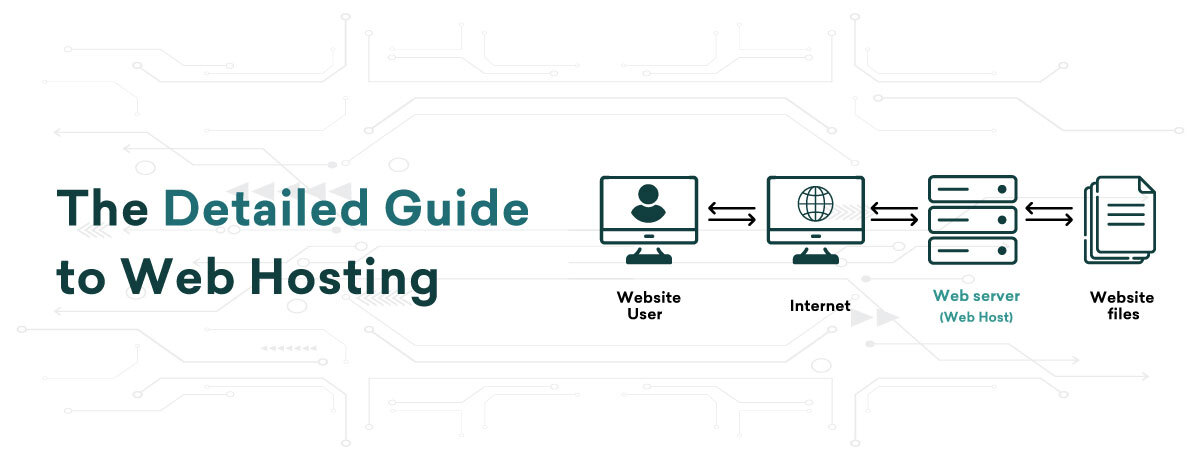
    Web hosting is a service on the internet that enables you to store, manage, and retrieve files, websites, and applications. This service relies on data storage servers and other infrastructure that are connected to the internet, operating 24/7 to ensure constant accessibility to the stored files online.

    In essence, when you create a website, all its files are housed on data servers. When a visitor accesses your site, data is transmitted from these hosting servers to their browser. The combined functions of storage, processing, and data transfer over the internet constitute web hosting services.

    Entities providing data storage and processing servers for web hosting are known as web hosts. By availing of a web hosting service, you render your website reachable to online users through the data servers provided by hosting companies. With this setup, anyone on the internet can visit your site by entering your domain in a browser.

    Since most businesses lack their own servers, they lease server space from web hosting entities. Servers serve as the technical backbone for housing websites and applications. Reputable web hosting providers deliver on the promise of 24/7 online availability and provide crucial technical assistance. This support becomes vital for website owners lacking the necessary technical know-how to handle various aspects of website hosting.

    How Does Web Hosting Work?

    The primary function of web hosting is to ensure your website is accessible on the internet. It involves data servers that are continuously operational and connected to the internet 24×7, enabling online visitors to access your websites. When a user enters a domain in a web browser like Google Chrome, the website hosted on these servers is retrieved and displayed to them online.

    Web hosting providers offer the necessary technologies for your sites to function effectively on the internet. They also provide server management support services to website owners lacking technical expertise in server management. With technical assistance from web hosting companies, website and business owners can concentrate on expanding their business rather than dealing with server maintenance.

    What are Different Types of Web Hosting?

    Various web hosting services are accessible in the market to cater to your requirements. The primary varieties of website hosting services include:

    1. Shared Hosting

    Shared hosting is ideal for small and new websites with low traffic. In this service, all web files from various users are stored on one server. This means server resources such as CPU, RAM, and disk space are shared among multiple websites on the same server.

    Server resources are shared among various web hosting account users, providing cost-effective access. Due to not leasing the entire server, expenses are divided among users, making shared hosting ideal and budget-friendly for new website owners.

    2. Virtual Private Server (VPS) Hosting

    This hosting service features a virtual server within a main physical server, splitting a large data storage and processing unit into smaller virtual servers. The division is not physical but virtual, concerning server resources like CPU, RAM, and Disk Space. Each virtual server has independent CPU, RAM, and disk space allocation, offering dedicated server performance at a budget-friendly price.

    VPS hosting is beneficial for expanding websites as all projects are hosted in a separate space on the server, though it is shared with other users. This service fulfills your needs for personalized web hosting. While handling traffic spikes and optimizing performance, it can be influenced by other sites on the server. In essence, VPS offers superior performance to shared hosting yet falls below dedicated servers. Furthermore, VPS demands slightly less technical know-how compared to Dedicated hosting.

    If you have a resource-intensive web project and seek affordable dedicated hosting services without the necessary technical expertise, you can opt for managed VPS hosting. This way, you can benefit from hosting operations at costs similar to shared hosting, while having hosting infrastructure comparable to dedicated servers. Through reliable VPS hosting servers, you will attain full root control over your servers.

    3. Dedicated Hosting

    Dedicated hosting grants website owners complete control over servers. It provides exclusive rental for the website, allowing enterprises handling numerous websites and applications to have full root and admin access. This service enables centralized control, including security and operating system management. However, the cost factor may deter small business owners from opting for this level of server resources.

    When opting for dedicated hosting, you rent the entire server for exclusive use, making it pricier than other services. Large websites or organizations with high online traffic often choose dedicated hosting for full server control. If you need technical support, consider managed dedicated hosting for seamless web application hosting.

    4. Cloud Hosting

    In today’s modern world, cloud infrastructure is rapidly gaining popularity. Cloud hosting involves a cluster of interconnected servers within a single network. Therefore, deploying web applications within this connected hosting infrastructure provides maximum scalability and accessibility for your web files. 

    Hosting servers are susceptible to malfunctions and encounter technical issues when managing resource-intensive websites and applications with high traffic fluctuations. Cloud hosting services provide users with resources distributed across multiple servers, minimizing the risk of downtime caused by server malfunctions.

    If your website expands, cloud hosting resources are scalable, allowing your site or app to utilize resources as needed. Essentially, in cloud hosting, resources are virtually limitless for scalability, and you only pay for the resources utilized by your site or app during a specific timeframe.

    5. Reseller Hosting

    In the hosting industry, a reseller hosting provider acts as a wholesaler while the reseller functions as a retailer. Reseller web hosting involves a smaller hosting company (the retailer) leasing servers and resources from a larger hosting company (the wholesaler), then selling these services to clients for a profit.

    Reseller hosting is ideal for small web service companies that cater to local clients, offering a cost-effective solution as they avoid significant upfront investments in infrastructure. Providers of reseller hosting services offer fully white-labeled solutions, enabling resellers to brand their hosting business effectively.

    Moreover, reseller hosting providers facilitate billing for end clients and offer technical support to resellers, alleviating concerns about  technical issues and web hosting management for the clients of resellers.

    Which Web Hosting Service is Right for You?

    After learning about various web hosting services, you might be wondering – which is the best hosting for me? When selecting web hosting services, choose a plan that fulfills your hosting needs. Assess if each plan aligns with your web hosting requirements.

    Choosing the appropriate web hosting plan involves careful consideration of the following aspects:

    – Number of websites to be hosted

    – Required disk space and RAM

    – Bandwidth (data transfer) limit needed

    – Your budget

    For novices and small-scale websites with limited hosting budgets, shared hosting services are recommended. If expecting increased website traffic, opt for VPS hosting services. For total server control, website owners should choose dedicated hosting services. Reseller hosting services cater to users starting their web hosting business.


    Conclusion

    In conclusion, choosing the right web hosting service is critical for your website’s success. Whether you’re a beginner or managing a high-traffic site, understanding options like managed, shared, VPS, dedicated, cloud, and reseller hosting helps match your needs for scalability, control, and budget. Explore our guide to make an informed choice and ensure your site has the solid hosting it needs to thrive online.

  • SEO for E-commerce: Strategies to Increase Traffic and Sales

    SEO for E-commerce: Strategies to Increase Traffic and Sales

    In the competitive world of online retail, it can be challenging to distinguish oneself. However, effective Search Engine Optimization (SEO) can make a significant difference in driving traffic and boosting sales. This blog will explore key SEO strategies specifically tailored for e-commerce websites.

    1. Keyword Research: The Foundation of SEO

    Effective SEO begins with thorough keyword research. For e-commerce, it’s essential to focus on:

    Product-Specific Keywords: These are the terms potential customers use to search for products you offer. Tools like Google Keyword Planner, Ahrefs, and SEMrush can help identify high-volume, low-competition keywords.

    Long-Tail Keywords: These are more specific phrases that often convert better than broad terms. For example, “best-running shoes for flat feet” is likely to attract more qualified traffic than just “running shoes.”

    Action Step: Regularly update your keyword list based on trends and customer behavior. Use these keywords strategically in product descriptions, titles, meta descriptions, and throughout your site’s content.

    2. Optimize Product Pages

    Each product page should be optimized to attract search engines and convert visitors. Key elements include:

    Unique Product Descriptions: Avoid duplicate content by writing unique descriptions for each product. Highlight benefits, features, and use cases.

    High-Quality Images: Use high-resolution images with descriptive file names and alt text that includes relevant keywords.

    Customer Reviews: Incorporate customer reviews as they provide fresh content and help with long-tail keyword rankings.

    Action Step: Regularly review and update product pages to ensure they are optimized and reflect current best practices.

    3. Create High-Quality Content

    Content marketing is crucial for e-commerce SEO. By creating valuable content, you can attract and engage potential customers.

    Blog Posts: Write informative articles related to your products. For instance, a clothing retailer might publish posts on fashion trends, style tips, or care guides.

    Buying Guides: Help customers make informed decisions by providing detailed buying guides. These can address common questions and concerns.

    Videos: Create product demos, how-to videos, and customer testimonials. Video content can significantly enhance user engagement and time spent on your site.

    Action Step: Develop a content calendar to ensure consistent publishing of high-quality content.

    4. Optimize for Mobile

    With the majority of online shopping now happening on mobile devices, mobile optimization is essential.

    Responsive Design: Ensure your website is fully responsive and provides a seamless experience on all devices.

    Fast Load Times: Mobile users expect fast load times. Optimize images, leverage browser caching, and consider using a content delivery network (CDN) to speed up your site.

    Action Step: Regularly test your website’s mobile performance and make necessary adjustments to improve user experience.

    5. Technical SEO

    Technical SEO involves optimizing the backend of your site to help search engines crawl and index it effectively.

    Site Structure: A well-organized site structure makes it easier for search engines to index your content. Use a logical hierarchy of categories and subcategories.

    XML Sitemaps: Submit an XML sitemap to Google and other search engines to help them discover your pages.

    HTTPS: Ensure your website is secure by using HTTPS. This not only improves SEO but also builds trust with customers.

    Action Step: Conduct regular technical audits to identify and fix any issues that might affect your site’s performance.

    6. Leverage Social Proof

    Social proof, such as customer reviews and testimonials, can boost your SEO efforts by driving organic traffic.

    User-Generated Content: Encourage customers to share photos and videos of your products on social media.

    Social Sharing: Make it easy for visitors to share your products and content on social media platforms.

    Action Step: Actively engage with customers on social media and feature user-generated content on your website.

    7. Link Building

    Building high-quality backlinks can significantly enhance your site’s authority and ranking.

    Guest Blogging: Write guest posts for reputable sites in your industry.

    Influencer Partnerships: Collaborate with influencers to reach a broader audience and gain valuable backlinks.

    Broken Link Building: Find broken links on other websites and offer your content as a replacement.

    Action Step: Develop a link-building strategy and consistently work on acquiring high-quality backlinks.


    Conclusion

    Implementing these SEO strategies can help e-commerce websites increase traffic and boost sales. By focusing on keyword research, optimizing product pages, creating valuable content, ensuring mobile optimization, addressing technical SEO, leveraging social proof, and building high-quality backlinks, your e-commerce site can achieve greater visibility and attract more potential customers. Regularly monitoring and adjusting your SEO efforts will ensure long-term success in the ever-evolving digital landscape.

  • Future of WordPress Hosting: Trends & Tech

    Future of WordPress Hosting: Trends & Tech

    WordPress continues to reign supreme as the content management system (CMS) of choice for millions of websites worldwide. But with technology constantly evolving, the question remains: what does the future hold for WordPress hosting?

    What is WordPress Hosting?

    WordPress Hosting is a web hosting service specifically designed for WordPress-powered websites. It meets the unique needs of WordPress sites, providing optimized environments and custom features for smooth performance, security, and user-friendliness.

    Unlike generic hosting services, WordPress Hosting tailors its servers to WordPress CMS, offering enhanced benefits and optimizations.

    This type of hosting forms the backbone of a WordPress website, offering more than just basic hosting services. It includes pre-installed software, specialized support, performance tweaks, and improved security measures.

    Trends in WordPress Hosting

    Increased Emphasis on Security

    Data breaches and malware attacks pose constant threats, and website owners are rightfully concerned. To tackle these issues, WordPress hosting providers are enhancing their security measures. They offer advanced security features such as automatic malware scanning, regular backups, and intrusion detection.

    Rise of Managed WordPress Hosting

    Managed WordPress hosting is gaining popularity as it simplifies website management. You no longer need to stress about technical aspects like server maintenance, security updates, or backups. Managed WordPress hosts take care of these tasks for you, allowing you to concentrate on important activities like creating content and expanding your website.

    Moreover, managed WordPress hosting plans are often optimized for WordPress performance. This translates to quicker website loading times and enhanced user experience for your visitors.

    Furthermore, many managed WordPress hosts provide staging environments where you can test website changes before implementing them live. This can help you prevent errors that might harm your website in the long run.

    Optimizing User Experience and Performance

    In today’s rapidly evolving digital landscape, online users display increasing impatience. They demand swift website loading times coupled with seamless functionality. As a consequence, a crucial trend in optimizing WordPress hosting revolves around prioritizing user experience (UX) and performance.

    In response to these heightened expectations, most hosting services offer a range of enhanced features. These encompass tailored servers optimized for WordPress, integrated caching mechanisms to boost website speed, and content delivery networks (CDNs) that disperse content across various global servers, thereby diminishing loading times for users worldwide.

    By accentuating UX and performance, WordPress hosting providers assist in crafting websites that not only present well but also provide a favorable encounter for visitors. This, in turn, can elevate user engagement levels, enhance conversion rates, and contribute to the overall success of your website.

    Integration with Emerging Tech

    Another kеy trеnd is thе intеgration of artificial intеlligеncе (AI) and automation. Imaginе your hosting platform using AI to strеamlinе wеbsitе managеmеnt tasks. This could include automatеd backups, sеcurity updatеs, and pеrformancе optimizations, saving you timе and еffort.

    Furthеrmorе, WordPrеss host providers might start offering built-in tools for SEO optimization, content creation, and data analysis. This will help to improve your wеbsitе’s ranking in sеarch results and gain valuable insights from your wеbsitе’s data all within your hosting platform.

    Tеch Shaping thе Futurе of WordPrеss Hosting

    Cloud Hosting

    One of the biggest reasons cloud hosting is emerging is its scalability. With cloud hosting, you can easily adjust your website’s resources up or down as needed. This means you can handle sudden traffic spikes without downtime and ensure your site runs smoothly even during periods of low traffic.

    Cloud hosting is also more reliable. Cloud providers offer high uptime and redundancy, meaning your website is less likely to experience downtimes. This ensures your visitors have a consistent and reliable experience, which is crucial for building trust and credibility.

    Besides robust security features, cloud hosting is often more cost-effective than traditional hosting options. You only pay for the resources you use, so you’re not stuck paying for unused capacity. This makes cloud hosting a scalable and cost-efficient solution for businesses of all sizes.

    Containerization

    Containerization allows you to run each WordPress site in its isolated container and offers several benefits. First, it enhances security by isolating each site. If one site is hacked, the other sites on the server remain secure.

    Secondly, it simplifies scaling your WordPress hosting. By adding more containers, you can easily allocate additional resources to your site. This scalability surpasses the limitations of traditional hosting.

    Thirdly, containerization reduces hosting costs. Since containers share the operating system, they consume fewer resources compared to traditional virtual options.

    Lastly, containerization streamlines the development and deployment of WordPress sites. Containers are portable, allowing for easy movement of your site among servers without worrying about compatibility issues.


    Conclusion

    With a strong focus on security, performance, and user experience, top WordPress hosting providers are rolling out advanced solutions customized to your site’s needs. Cloud hosting and containerization are key technologies shaping future progress, offering scalability, reliability, and cost-effectiveness. As these trends and technologies develop further, anticipate an improved experience in handling and hosting your WordPress site.

  • Benefits of Choosing Windows VPS Hosting

    Benefits of Choosing Windows VPS Hosting

    Shared hosting plans are ideal for budding entrepreneurs, startups, and newbie bloggers. They are well-suited for websites with low traffic and minimal data, providing an affordable and straightforward hosting solution. However, as your website grows in traffic and data, upgrading your hosting plan becomes essential. Compared to shared hosting, a VPS hosting plan offers better performance by providing a dedicated OS, disk space, and higher bandwidth, ensuring an improved user experience.

    Now, let’s explore the benefits of a Windows VPS hosting plan over other hosting options available in the marketplace. But before we dive into the features, let’s understand what a Windows Virtual Private Server (VPS) is. Let’s get started.

    What is Windows VPS Hosting?

    VPS hosting that operates on the Windows OS is known as Windows VPS hosting. This offers users the advantage of a dedicated virtual server with greater control and resources compared to other hosting options. For businesses seeking secure hosting services with Windows-compatible technology and environment, VPS hosting with Windows OS is the ideal choice. For businesses accustomed to using Microsoft systems and tools to oversee various business operations, Windows VPS hosting stands out in its ability to efficiently manage the server.

    Benefits of Windows VPS Hosting

    Backup & Remote Support: In the digital realm, data is invaluable. Windows VPS hosting offers superior data security, regular backups, and round-the-clock remote support from experts, ensuring your data is safeguarded and readily recoverable in case of issues.

    Customized Solutions: Tailor your server to meet specific website needs with Windows VPS hosting. Customize features and allocate resources effectively to handle future demands with ease.

    Higher Reliability: Opting for Windows VPS hosting from a trusted provider in Kolkata ensures enhanced server security, comprehensive data backup, and system reliability. This plan helps prevent unauthorized access and mitigates the risk of malware attacks on personal and business data.

    Dedicated Resources: Windows VPS hosting provides full control over server resources unlike shared hosting. Regardless of traffic surges, your website’s loading time remains consistent, reducing bounce rates and enhancing user experience and satisfaction.

    Why Windows VPS Hosting is a Superior Choice?

    Choosing Windows VPS hosting offers a balanced blend of flexibility, performance, and security. Here are more reasons why this hosting plan is superior:

    Scalable Performance

    Improving website performance involves ensuring fast loading times and smooth operation for users. Opting for a VPS can enhance performance as it reduces the impact of other users on the server. Beyond this, VPS provides benefits like resource accessibility, increased storage, higher bandwidth, and updated technology, all of which can boost website traffic and speed.

    As your business grows, you can easily scale up resources by upgrading your VPS plan. Conversely, during downtimes, you have the flexibility to reduce technical resources. VPS eliminates the need for lengthy data transfers and complex hardware setups, offering a hassle-free experience.

    Moreover, when executing promotional campaigns on your website, such as paid ads or special offers to attract customers, VPS serves as a comprehensive solution to meet your needs.

    Robust Security

    Whether you are an individual or a large company, web hosting security is a major concern for anyone with an online presence. Stolen financial information, data loss, and compromised website content can have a direct negative impact on your business.

    To address these issues, VPS hosts your data files in a secure partition that is inaccessible to other clients, enhancing your data security. With root access to your server unlike shared hosting, you can implement advanced security measures for your server. This independent access to resources helps keep your data safe from other sources.

    For e-commerce businesses in particular, VPS or Dedicated Server Hosting can offer significant benefits. With a dedicated IP address, your website’s identity is unique, especially when providing features like email marketing and secure e-commerce transactions.

    In conclusion, the security provided by VPS can be compared to that of a Dedicated Server at a lower cost. Therefore, opting for VPS will protect your website and data from unauthorized access.

    Cost-Effective Solution

    VPS is the hybrid form of shared and dedicated hosting, offering ample resources at manageable costs. Choosing a Windows VPS allows you to easily scale server specifications as your website expands, making it a more cost-efficient choice than shared hosting. Moreover, scaling disk space and bandwidth to accommodate your site’s growth is effortless, eliminating concerns about server migration or plan changes.

    Unlike with Dedicated Server Hosting, where you must bear the significant expense of purchasing a physical server, with VPS, you only need to invest according to your requirements. 

    Administrative Control: 

    Windows VPS hosting offers extensive administrative control, allowing you to customize and optimize your server environment to meet your business needs. You can install any necessary software or applications, tailor server settings to enhance performance and security, and configure specific features for optimal functionality.

    With full administrative access, you can implement advanced security measures, manage user access, and schedule regular updates to protect your data. Efficient resource management ensures that critical applications receive the necessary CPU, RAM, and storage, maintaining consistent performance even during peak traffic times.

    Administrative control also allows you to set up and manage backup processes, ensuring quick data recovery in case of loss or system failure. Comprehensive monitoring tools keep you informed about server performance and potential issues, enabling proactive maintenance.

    As your business grows, administrative control ensures that you can easily scale your server resources, adding storage, bandwidth, or processing power as needed. This flexibility provides a future-proof solution, ensuring your server infrastructure evolves with your business.


    Conclusion

    Windows VPS hosting is a great option for businesses looking for improved control, performance, and security. While shared hosting suits startups and low-traffic sites, VPS hosting is crucial as your site grows. It provides top-notch data security, regular backups, and round-the-clock support, ensuring constant data protection and accessibility. Customization features enable efficient resource allocation and feature tailoring, maintaining consistent performance and high user satisfaction. Scalability allows easy resource adjustments as your business expands, with strong security measures to safeguard your data. Offering cost-effectiveness and benefits similar to a dedicated server, Windows VPS hosting provides extensive administrative control for optimal server management. This flexibility guarantees your server infrastructure can grow with your business, offering a reliable and scalable solution for expansion.

  • How to Monitor MySQL Databases: A Comprehensive Guide

    How to Monitor MySQL Databases: A Comprehensive Guide

    Monitoring MySQL databases is crucial for maintaining peak performance and safeguarding data integrity. It enables administrators and developers to detect and resolve issues proactively, ensuring seamless database operations. Effective monitoring entails monitoring performance metrics, analyzing query efficiency, and observing server health indicators. By embracing robust monitoring practices, you can optimize MySQL database performance, reduce downtime, and improve user experience.

    Key Metrics to Monitor in MySQL

    Monitoring the correct metrics is crucial for maintaining MySQL database performance and stability. Here are some critical metrics to monitor:

    Performance Metrics

    Monitoring query performance, encompassing execution time, slow queries, and query throughput, aids in identifying inefficient queries requiring optimization. Observing connection statistics like active connections, aborted connections, and connection errors guarantees effective handling of the database load.

    Indicators of Server Health

    High CPU usage could suggest inefficient queries or inadequate server resources. Monitoring CPU utilization is crucial for sustaining peak performance. Tracking memory usage is essential to guarantee that your server possesses adequate resources for seamless operation and can identify memory leaks or excessive consumption due to specific queries.

    Storage Metrics

    Monitoring disk I/O and disk space is crucial for identifying potential bottlenecks caused by sluggish storage devices. Tracking disk read/write operations and available disk space can help prevent the database from running out of storage, thus avoiding crashes or performance degradation.

    Data Quality Metrics

    Regularly monitoring MySQL error logs for signs of corruption or any issues can help prevent data integrity problems. If you utilize replication, keeping an eye on the status and lag of replica servers is crucial to maintain data consistency across all your MySQL instances.

    Metrics for Network

    Network latency and throughput are crucial for identifying issues that may impact database performance, particularly in distributed settings. Tracking these metrics helps ensure that the network can handle your applications’ requirements.

    Recommended Tools for Monitoring MySQL

    To begin monitoring MySQL databases, the selection of appropriate tools is crucial. Factors to consider when choosing a monitoring tool include ease of setup, real-time monitoring abilities, customizable dashboards, alerting functionalities, integration options, community support, and pricing. Below are some well-known choices:

    MySQL Enterprise Monitor

    MySQL Enterprise Monitor, created by Oracle, is tailored for MySQL databases, offering thorough real-time monitoring and performance optimization.

    • Developed by Oracle for MySQL databases.
    • Offers live monitoring and performance optimization.
    • Simplified connection to MySQL server.

    Nagios 

    Nagios is a popular open-source monitoring tool with extensive plugin support. It can monitor various services such as MySQL and provides customizable alerting and reporting features.

    • Open-source monitoring tool with extensive plugin support.
    • Able to monitor different services, such as MySQL.
    • Provides customizable alerting and reporting functionalities.

    Zabbix

    Zabbix is an open-source monitoring solution with robust community support. It offers detailed metrics and comprehensive dashboards, enabling the monitoring of numerous servers and services.

    • Open-source monitoring solution with a vibrant community.
    • In-depth dashboards and precise metrics.
    • Supports monitoring of multiple servers and services.

    Datadog

    Datadog is a cloud-based monitoring service that provides a broad array of integrations. It provides real-time analytics and customizable dashboards, simplifying setup by automating the discovery of MySQL metrics.

    • Cloud-based monitoring service offering a wide array of integrations.
    • Provides real-time analytics and customizable dashboards.
    • Simple setup with automatic discovery of MySQL metrics.

    Best Practices for Monitoring MySQL

    For optimal performance of your MySQL databases, follow these monitoring best practices:

    Regular Database Monitoring

    Create a schedule for consistently monitoring your MySQL databases. Plan regular checks to assess performance metrics, server health indicators, and error logs. Continuous monitoring enables early detection of potential issues and ensures database stability.

    Analyze and Respond to Metrics

    Regularly analyze the gathered metrics to spot trends and possible issues. Utilize this data to make informed choices on optimizing queries, adjusting resource allocations, and resolving any performance bottlenecks. Prompt reactions to anomalies can avert minor problems from worsening.

    Maintain Optimal Performance

    Execute maintenance tasks like indexing, query optimization, and regular updates. Keep your database server and monitoring tools current to leverage the newest features and security patches. Document monitoring procedures and ensure your team is proficient in following them.is trained to follow them. 

    Conclusion

    Effective monitoring of MySQL databases is crucial for maintaining performance, reliability, and overall health. Utilizing tools like MySQL Enterprise Monitor, Nagios, Zabbix, and Datadog provides valuable insights into database operations. Monitoring key metrics such as query performance, server health indicators, storage usage, data integrity, and network performance aids in identifying and resolving issues proactively.Adhering to best practices, including regular monitoring, analyzing metrics, and ensuring optimal performance through indexing and updates, guarantees efficient database operations. Proactive monitoring not only prevents issues but also optimizes resources and enhances user experience.

    To sum up, consistent and comprehensive MySQL monitoring is vital for ensuring databases consistently perform well, reducing downtime, and improving application efficiency. Implement these practices to maintain robust, secure, and responsive databases.

  • Enhance Security with ByteNAP SSL Certificates and BitNinja

    Enhance Security with ByteNAP SSL Certificates and BitNinja

    In today’s digital landscape, website security is paramount. With cyber threats evolving rapidly, businesses must safeguard their online presence to protect sensitive data and maintain customer trust. ByteNAP offers a comprehensive suite of security solutions, prominently featuring SSL Certificates and BitNinja, to ensure your website remains secure and resilient against cyber attacks.

    Understanding the Importance of Website Security

    Before exploring ByteNAP’s offerings, it’s crucial to understand why website security is so vital. Cyberattacks can result in data breaches, financial losses, and damage to your brand’s reputation. Hackers can steal sensitive information, inject malicious code, and even take your website offline. In this context, investing in comprehensive security measures is a proactive step to protect your business and its customers.

    Understanding SSL Certificates

    SSL (Secure Sockets Layer) Certificates are the backbone of website security. They establish an encrypted link between a web server and a browser, ensuring that all data passed between the two remains private and integral. Here’s why SSL Certificates are indispensable:

    Data Encryption

    SSL Certificates encrypt sensitive information, making it unreadable to anyone except the intended recipient. This encryption is crucial for protecting customer data such as credit card numbers, personal information, and login credentials.

    Authentication

    An SSL Certificate provides authentication, ensuring that your website is verified and trustworthy. When a user sees the padlock symbol in their browser’s address bar, they know they’re on a secure site.

    Data Integrity

    SSL Certificates ensure that data cannot be corrupted or altered during transfer without being detected. This integrity is essential for maintaining the accuracy and reliability of the data exchanged.

    SEO Benefits

    Search engines, particularly Google, give preference to HTTPS-enabled websites. Having an SSL Certificate can improve your search engine ranking, driving more traffic to your site.

    ByteNAP’s SSL Certificates

    ByteNAP offers a range of SSL certificates tailored to meet different security needs. Whether you run a small blog or a large e-commerce site, there is an SSL certificate that suits your requirements. Here are some of the key features of ByteNAP’s SSL certificates:

    1. High-Level Encryption: ByteNAP’s SSL certificates provide 256-bit encryption, the highest standard in the industry. This ensures that data transmitted between your website and its users is secure and unreadable by unauthorized parties.
    2. Trust Indicators: Websites with ByteNAP’s SSL certificates display trust indicators such as the padlock icon and “https://” in the address bar. These visual signs provide reassurance to visitors that their connection is secure.
    3. Boosted SEO: Google and other search engines favour secure websites. By using ByteNAP’s SSL certificates, you can improve your search engine rankings and attract more organic traffic.
    4. Enhanced User Trust: When visitors see that your website uses an SSL certificate, they are more likely to trust your site, leading to higher engagement and conversion rates.

    Enhancing Security with BitNinja

    While SSL certificates are crucial for encrypting data and authenticating your website, they are just one part of a comprehensive security strategy. To further enhance website security, ByteNAP integrates BitNinja, a powerful server security tool.

    What is BitNinja?

    BitNinja is an all-in-one security solution designed to protect servers from a wide range of cyber threats. It combines various security modules into a single, easy-to-use platform, offering comprehensive protection without the need for multiple tools.

    Key Features of BitNinja

    1. Web Application Firewall (WAF): BitNinja’s WAF blocks malicious traffic and protects against common web threats such as SQL injection, cross-site scripting (XSS), and remote file inclusion.
    2. IP Reputation Management: BitNinja maintains a global database of malicious IP addresses. Any traffic coming from these IPs is automatically blocked, preventing potential attacks before they reach your server.
    3. DoS Protection: Denial of Service (DoS) attacks can overwhelm your server with traffic, causing it to crash. BitNinja’s DoS protection module mitigates these attacks, ensuring your website remains accessible.
    4. Malware Detection and Removal: BitNinja continuously scans your server for malware, automatically removing any threats it detects to keep your website clean and secure.

    5. Log Analysis: By analyzing server logs in real time, BitNinja can identify and block suspicious activity, providing an additional layer of security.

    How ByteNAP’s SSL Certificates and BitNinja Work Together

    Combining ByteNAP’s SSL certificates with BitNinja creates a robust security framework for your website. While SSL certificates ensure that data transmitted between your website and its users is encrypted, BitNinja provides an additional layer of protection against various cyber threats.

    Combining ByteNAP’s SSL Certificates with BitNinja creates a formidable security framework for your website. Here’s how these two solutions work together to maximize your website’s security:

    End-to-End Encryption and Threat Detection

    SSL Certificates ensure that data transferred between your users and your server is encrypted, while BitNinja continuously monitors your server for threats. This dual-layer protection ensures that sensitive information remains secure both in transit and at rest.

    Enhanced Trust and Credibility

    By displaying the SSL padlock symbol and offering robust protection against cyber threats, your website will build trust and credibility with your users. This trust can lead to increased user engagement, higher conversion rates, and improved customer loyalty.

    Proactive and Reactive Defense

    SSL Certificates provide a proactive layer of defence by encrypting data, whereas BitNinja offers reactive defence mechanisms that identify and neutralize threats in real time. This combination ensures comprehensive protection against both known and emerging threats.

    Improved SEO and User Experience

    Google and other search engines prioritize secure websites. By securing your site with an SSL Certificate and maintaining its integrity with BitNinja, you can improve your SEO rankings. Additionally, a secure site enhances user experience, as visitors feel safe when interacting with your website.


    Conclusion

    In an era where cyber threats are increasingly sophisticated, safeguarding your website with robust security measures is essential. ByteNAP’s SSL Certificates and BitNinja provide a comprehensive security solution that protects your website from data breaches, malware, and other cyber threats. By investing in these tools, you not only enhance your website’s security but also build trust with your users, improve your SEO rankings, and ensure a seamless user experience.

    Secure your website today with ByteNAP’s SSL Certificates and BitNinja, and enjoy the peace of mind that comes with knowing your online presence is well-protected.

  • Benefits of Upgrading to Google Workspace

    Benefits of Upgrading to Google Workspace

    The likelihood is high that your team already uses Google for communication, be it Gmail or Google Duo for personal connections or Google Drive for sharing files and presentations at work. These consumer apps enable team communication and collaboration easily, for free. Hence, what’s the point in transitioning your small business to Google Workspace?

    The brief explanation is that Google Workspace provides your organization with increased control and additional features, enabling you to safeguard documents and data, collaborate more efficiently, and utilize advanced features and programs to enhance team productivity, collaboration, and information access.

    Google Workspace enables you to enjoy the advantages of genuine digital transformation, such as the capacity to operate in novel manners that facilitate hybrid and remote work setups. 

    Use the Gmail client to send branded emails

    With Google Workspace, you get all the attributes, reliability, and familiarity of Gmail, customized with your organization’s domain name. This offers employees the familiar user experience they are already comfortable with from using personal Gmail accounts, enabling them to seamlessly switch between personal and work accounts.

    Employers benefit from a premium enterprise-grade email service that offers control and security without the hassle of managing an email server. They can effortlessly add or remove users as the business grows.

    Furthermore, every user is allowed to have a maximum of 30 alias accounts. This enables a single individual to receive emails across multiple addresses such as [email protected], [email protected], and [email protected].

    Use Google Drive to save and share countless files

    Each user has a Drive account for storing personal notes, drafts, and files inaccessible to teammates. Furthermore, each team can possess a Team Drive, enabling file and resource sharing among members. Although sharing is possible via the consumer Drive version, users must individually grant access and set permissions. This process is time-consuming, and omission of necessary individuals requires them to request access, leading to delays as they await email approval from the document owner.

    With Team Drive, everyone who needs access already has it, and if an employee leaves the company, the Team Drive manager can quickly revoke their access to any company data. If everyone hosts and shares files from their personal Google accounts, then everyone has to remember to revoke access from former colleagues.

    Both individual and Team Drives offer unlimited cloud storage in Google Workspace for Enterprise. The Business Starter Google Workspace provides 30GB of storage, which is twice that of the free version. Additionally, there are options available for 2TB and 5TB storage capacities.

    Collaborate in real-time

    Collaboration can be difficult, even with everyone in the office, but it becomes even more complex as workers are now spread between the office and remote locations. Google Workspace provides a range of collaboration apps available only in the Business edition or through upgrades from the consumer edition.

    With real-time co-editing in Google Workspace, teams can simultaneously edit the same Doc, Sheet or Slide, eliminating version control concerns when working remotely or in a hybrid environment. Changes are immediate, allowing for collaborative idea-building and quick consensus through comments and action items. If discussions are needed, team members can easily schedule meetings using Team Calendar, have unrestricted Google Meet video calls, or resolve details via Team Chat. Google Currents enables the creation of an internal social network to enhance communication within the organization, facilitating content sharing, discussions, and employee engagement as the leadership team defines the company’s new normal.

    Integrate Google Workspace with third-party apps

    By integrating Google Workspace with CRM and other productivity applications, your team can seamlessly collaborate across platforms, all from within the Google Workspace app. Employees access work apps with a single sign-on, and they avoid wasting time switching between different tools, preventing duplicated efforts and data. This integration provides a productivity boost for your company, ensuring data consistency and reducing the risk of human errors.

    For instance, through CRM integration, salespeople and customer service representatives can automatically log tasks, calls, meetings, and emails in Salesforce directly from Gmail. They can also access contact and account insights from Salesforce within Google Workspace and effortlessly import CRM data into Google Sheets.

    Manage it all from the Admin Console

    The Google Workspace Admin Console enables you to oversee your data, users, and applications all in one place. User-friendly dashboards allow you to add or remove users and groups, personalize the user interface, manage devices, establish roles, grant permissions, and configure security settings.

    For instance, you have the ability to block untrusted applications, enforce security keys, or mandate two-step verification.

    When users log into Google Workspace or associated apps using a new computer or mobile device, Google will dispatch a text message containing a verification code that must be inputted before company data can be accessed. Additionally, Google Workspace offers advanced email scanning for security threat detection, as well as security analytics and recommendations to safeguard your business.

    Improve security with Enterprise-Level Endpoint Management

    The Admin Console allows you to manage Google Workspace accounts; Endpoint Management allows you to control the devices that can access those accounts.

    Using Google Workspace Endpoint Management, you can efficiently distribute apps on mobile devices at scale. You can monitor usage, adjust security settings, and restrict access on any device. In case of a lost or stolen device, you can remotely erase confidential data by wiping the device or the account.

    Protect company data using Google Vault

    You may save vital information, even from inert accounts, for as long as needed using Vault. To protect user data against deleted files and suspended accounts, you can set retention policies and holds on particular Google Workspace applications. This helps your legal team foresee possible problems and mitigates data loss when employees leave the company.

    Universal search simplifies finding desired data, and content can be exported to printable formats. Vault enables tracking user activity, including searches, content views, and exports.

    Launch websites with Google Sites

    Need a website for your startup? Or maybe you’re an established company needing a new interactive way to share information with customers or remote teams.

    With Sites, your team can collaborate to build engaging, top-notch websites – no programming skills required. They can easily extract content from Google Workspace apps and drag it into grids or templates. They can also co-edit projects, leave comments, and control access just like in Docs.

    Achieve productivity and insights driven by AI

    Google Workspace uses machine learning, natural language processing, and other AI technologies to streamline processes, automate tasks, and provide teams with data-driven insights for making informed business decisions.For instance, Google Assistant helps find and add optimized rooms for each attendee when employees schedule virtual meetings in Calendar. Smart Compose in Gmail can complete sentences for users, and Nudge reminds them to respond to messages. Additionally, Google Sheets is integrated with BigQuery, allowing employees to conveniently manage, analyze, and interpret large amounts of real-time data.

    Ensure a uniform experience on all devices

    Google Workspace is compatible with any internet browser, but it provides the best experience on Google Chrome. Users can create a Google Chrome bookmark bar and sync Chrome across all their devices to access Google Workspace. This means that whether your team members are using a smartphone, tablet, or laptop, they can have access to an optimized desktop.

    Explore more essential apps to support your growing business, and take advantage of exclusive business pricing, financing, trade-in options, and deals on everything from phones and tablets to monitors and memory.

    Conclusion

    Transitioning your small business to Google Workspace offers numerous benefits, providing enhanced control, security, and productivity features. It enables efficient communication, seamless file management, real-time collaboration, and digital transformation for modern work setups. Google Workspace empowers your team and positions your business for success in the digital era.